Experience a Demo of TicketSpice
Watch an instant demo of our best ticketing features or register for a custom VIP demo for larger events & attractions.
The TicketSpice demo covers everything from creating your ticketing page, to managing attendees, reporting, and on-site ticket scanning.

Sell Tickets For Reserved Seating Events
TicketSpice has made it easier than ever to sell tickets online for your reserved seating event.
Whether in a theatre, auditorium, concert hall, or arena, TicketSpice's reserved seating platform puts you in control to sell out your venue.
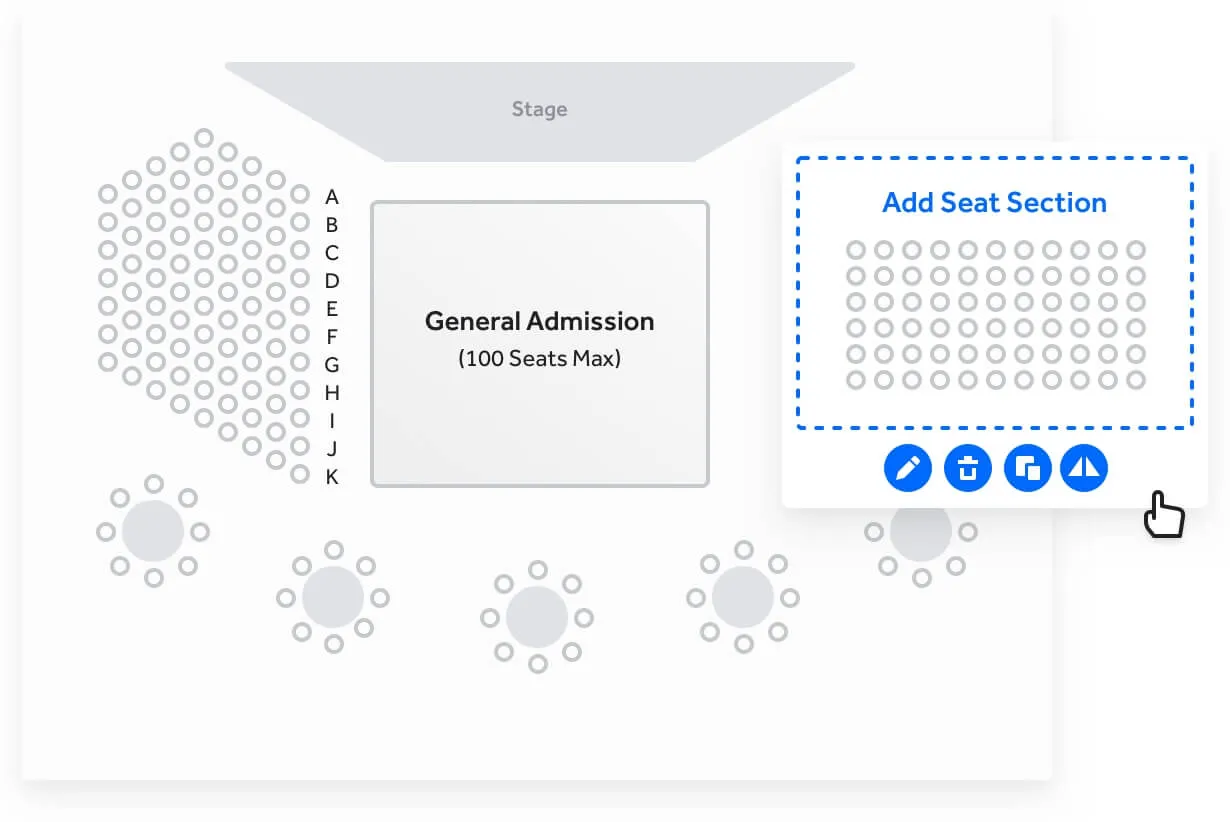
Interactive seating chart builder
Create your own seating chart in minutes using our simple web interface. From simple venues to complex ones, our drag and drop reserved seating chart creator helps you recreate your venue to near perfection.
Mix reserved seating with open general admission areas. Add VIP tables and build in social distancing pods. The sky is the limit.
No matter how complex or crazy the seat naming is, you can customize every row and seat assignment easily.
Flexible pricing tiers and customized ticket selling order
Optimize and maximize the revenue for the best seats by customizing your pricing tiers for any selection of seats within a section.
Set senior, student, child, and veteran price points for a given seat with ease. And should you desire to control the selling order, TicketSpice's reserved seating sales platform lets you control how seats are sold and in which order.

Seat view preview
Take the guess work out of the ticket buying experience with the seat view section preview. The reserved seating layout builder lets you upload seat view images from any section so that ticket buyers know what to expect at your event.

Seat holds and group sections
We know how difficult it can be to manage holds for your VIP and special guests. With TicketSpice, you can hold back any number of seats with a special link that lets your guest instantly reserve them. Set an expiration date for when the hold gets released back to the public.
TicketSpice makes selling reserved seating tickets to large groups easy. Our pool hold feature lets you define a set of seats, rows, or sections which will only be available to members of the group.
Using a special link, each member of the group can select their seat within the allocation ensuring they will be seated next to other members of their group.

Tables and PODs layouts
Create table seating layouts or pods with just a few clicks. Simply configure how many seats are available at each table or POD and organize them within the layout of your venue. Mix reserved seating with PODs, tables, and general admission to let buyers choose their event experience.
PODs layouts are designed to honor any social distancing guidelines so that members of the same party or household are seated together. When PODs are used, the buyer will be required purchase all seats within the pod.

Stunningly easy seat selection experience from mobile devices
From finding the best available seats to hand selecting seats in a particular section, the mobile purchasing experience of TicketSpice's reserved seating system is a cut above.

See Reserved Seating In Action at The Bayside Christmas Event
Reserved seating is just one reason why TicketSpice is the best event ticketing platform on the market today.
Drag and Drop Seating Chart Builder
Create reserved seating charts for any kind of venue including theaters, auditoriums, arenas, and more.
Flexible Tiers
Set unlimited pricing tiers and assign them to any seat, row, or section in the venue.
Private and Pool Seat Holds
Hold back seats for private parties and VIPs as well as set aside sections and rows for large groups.
Pods and Table Layouts
Unique and flexible layouts such as tables and PODs to create a truly unique seating venue.
Set Price Points
Sell the same seat at multiple price points for students, veterans, and seniors.
Mobile Awesome
Reserving seats on mobile devices is easy and intuitive so your buyers get the seats they want.
Join a TicketSpice Demo
Seeing is believing. Attend a demo and check out event ticketing with TicketSpice. You’ll learn to use the ticketing page builder, manage attendees, run reports, and more.


.avif)
.avif)

.avif)