Sell Tickets For Reserved Seating Events

TicketSpice has made it easier than ever to sell tickets online for your reserved seating event.
‍

Whether in a theatre, auditorium, concert hall, or arena, TicketSpice's reserved seating platform puts you in control to sell out your venue.

Interactive seating chart builder

Create your seating chart in minutes using our simple interface. From straightforward venues to complex layouts, our drag-and-drop reserved seating chart builder helps you recreate your venue with precision.

Mix reserved seating with open general admission areas. Add VIP tables, images, text labels, and visual markers to make your layout easy to understand. The sky is the limit.

No matter how complex your seat naming is, you can customize every row and seat assignment easily.
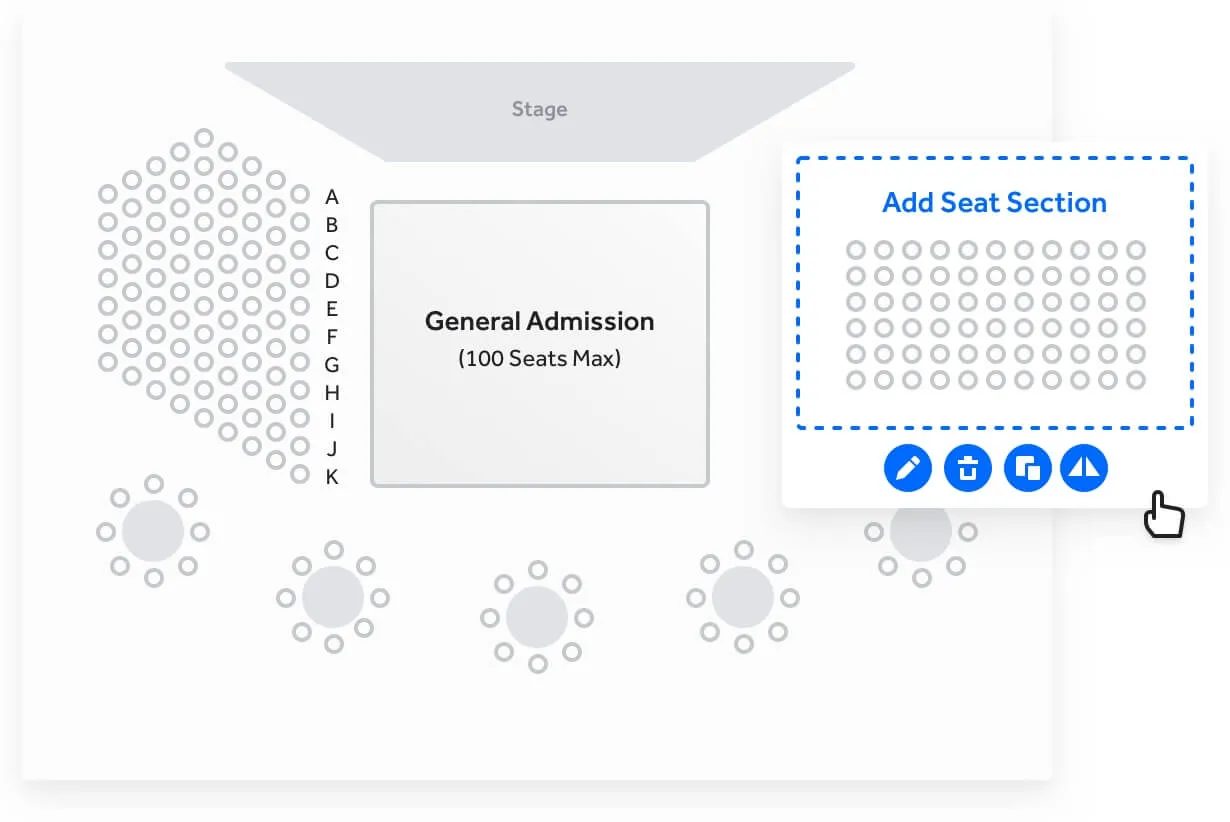
Event seating chart showing a stage with a general admission section in the center (100 seats max), labeled rows A to K on the left block with circular seat icons, and round table seating below; an editable add seat section is highlighted on the right.

Flexible pricing tiers and customized ticket selling order

Optimize and maximize the revenue for the best seats by customizing your pricing tiers for any selection of seats within a section.

‍

Set senior, student, child, and veteran price points for a given seat with ease. And should you desire to control the selling order, TicketSpice's reserved seating sales platform lets you control how seats are sold and in which order.

Seating chart with rows A to K divided into three pricing tiers shown by green, blue, and purple dots, alongside a panel to assign and edit pricing tiers labeled Top Tier Seats, Mid Tier Seats, and The Back Rows with seat counts.

Seat view preview

Take the guess work out of the ticket buying experience with the seat view section preview. The reserved seating layout builder lets you upload seat view images from any section so that ticket buyers know what to expect at your event.

Concert seating map highlighting Row K, Seat 11 in the Mezzanine section with ticket prices for adult, student, and senior categories.

Seat holds and group sections

We know how difficult it can be to manage holds for your VIP and special guests. With TicketSpice, you can hold back any number of seats with a special link that lets your guest instantly reserve them. Set an expiration date for when the hold gets released back to the public.

‍

TicketSpice makes selling reserved seating tickets to large groups easy. Our pool hold feature lets you define a set of seats, rows, or sections which will only be available to members of the group.

‍

Using a special link, each member of the group can select their seat within the allocation ensuring they will be seated next to other members of their group.

User interface showing seat hold assignments with four groups: Honorary Guests, Staff and Plus 1s, Award Winners, and The Cross Family, each with seat counts and edit/delete icons. On the right, details for Honorary Guests include name, hold code, visibility toggle, hold release date and time, and hold type selectors with save and cancel buttons.

See the status of every seat

Export a complete view of your venue organized by section, row, and seat. See which seats are sold, available, or held alongside buyer details, ticket pricing, scan activity, hold codes, and release information.

‍

Use these insights to identify sections that need more promotion, evaluate pricing performance, manage seat holds, and make more informed sales and operational decisions.

User interface showing seat hold assignments with four groups: Honorary Guests, Staff and Plus 1s, Award Winners, and The Cross Family, each with seat counts and edit/delete icons. On the right, details for Honorary Guests include name, hold code, visibility toggle, hold release date and time, and hold type selectors with save and cancel buttons.

Tables and PODs layouts

Create round, square, or rectangular table layouts and pods that reflect your venue. Set the number of seats per side, adjust spacing, and combine tables into custom formations for banquets, galas, VIP sections, sponsor areas, and more.

‍

Sell seats individually or require guests to purchase an entire table or pod. You can also combine tables and pods with assigned seating and general admission areas in the same venue.

Seating chart with circular tables and an option popup to add a table, featuring icons for editing, deleting, and copying.

Stunningly easy seat selection experience from mobile devices

From finding the best available seats to hand selecting seats in a particular section, the mobile purchasing experience of TicketSpice's reserved seating system is a cut above.

Entertainment 720 mobile interface with a seating chart of available seats in blue and an order summary listing four seats in row B with prices, showing a total of $240 to checkout.

Collect information for every attendee

Collect each reserved ticket holder’s name, phone number, and email address—not only the purchaser’s information. Each guest can receive a named ticket, check in individually, and be added to your CRM for future email or text communication.

‍

This is especially helpful for table reservations, VIP experiences, fundraisers, galas, and other events where knowing exactly who occupies each seat matters.

Entertainment 720 mobile interface with a seating chart of available seats in blue and an order summary listing four seats in row B with prices, showing a total of $240 to checkout.

See Reserved Seating In Action at The Bayside Christmas Event

Reserved seating is just one reason why TicketSpice is the best event ticketing platform on the market today.

  • Drag and Drop Seating Chart Builder

    Create reserved seating charts for any kind of venue including theaters, auditoriums, arenas, and more.

  • Flexible Tiers

    Set unlimited pricing tiers and assign them to any seat, row, or section in the venue.

  • Private and Pool Seat Holds

    Hold back seats for private parties and VIPs as well as set aside sections and rows for large groups.

  • Pods and Table Layouts

    Unique and flexible layouts such as tables and PODs to create a truly unique seating venue.

  • Attendee details by seat

    Collect a name, phone number, and email address for each individual reserved ticket.

  • Complete seating status exports

    Review sold, available, and held seats alongside pricing, buyer, scan, and hold details.

Resources

Helpful reads for better ticketing

Tips, guides, and best practices to help you sell more tickets, save time, and run things smoother.

Take The Shortcut
Take The Shortcut

Join a TicketSpice Demo

Seeing is believing. Attend a demo and check out online and on-site ticketing with TicketSpice. You’ll learn to use the ticketing page builder, manage attendees, run reports, and more.

Attend a Demo
Attend a Demo
a man smiling for a picture
Portrait of Eric Knopf, CEO and Co-Founder of Ticketspice, smiling and wearing a light gray button-up shirt.
Eric Knopf, CEO
Black modern electric trick scooter parked on a sidewalk near a wall with shadow.
Blurred abstract image with teal and green tones and horizontal streaks on the right side.
a black play button in a white circle