
Great news!
We have a new feature for adding custom navigation menus on your TicketSpice page plus some fun idioms that never made sense to us.
We’re excited to tell you about the new custom navigation bar you can add to any TicketSpice page that helps you unlock brand new possibilities.
Watch a short 4 minute demo of the new tools or keep reading below!
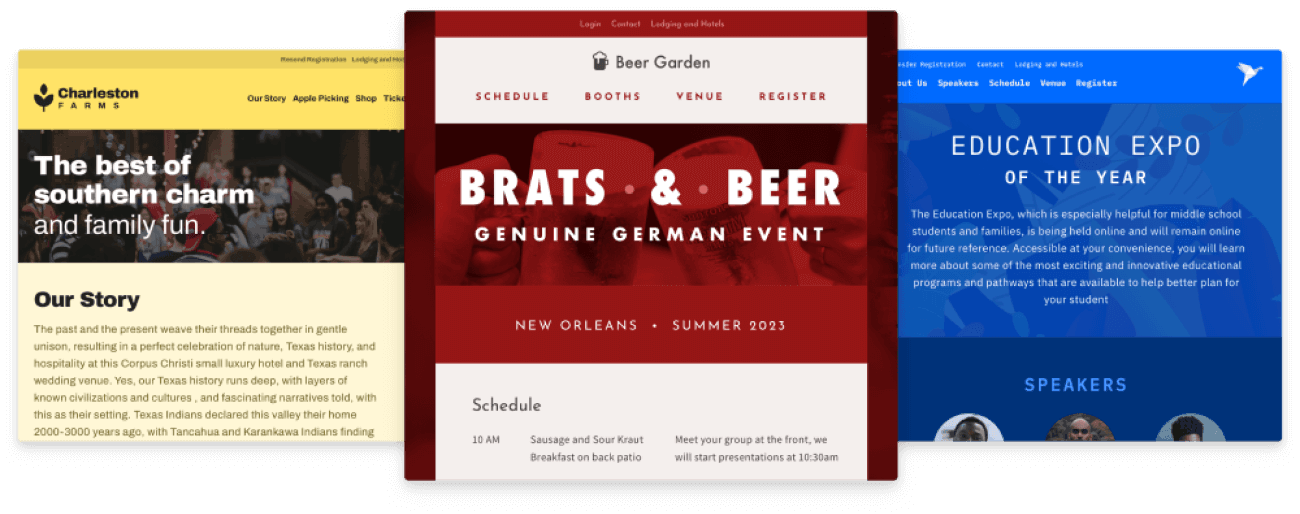
What is a custom navigation bar? Well, a custom navigation bar lets you have ticketing pages look like this…

What can I do with this feature and how does it help me?
We’re so glad you asked. Well, we actually couldn’t hear you say that, but hopefully you were asking in your head.
1. First, the custom navigation bar lets you create ticketing pages that look and function like a website. You can create marketing domains such as, MyReallyCoolEvent.com that directly forward to your ticketing page.
2. Second, it can help you break up sections and content on your ticketing page (If you have a hard time with brevity like me) where visitors can quickly jump to sections of your registration page.
3. Last, you can create links to external sites for directions, sponsors, etc, as well as links to send emails to specific addresses.
Here are some highlights of the navigation bar feature
1. Easy as pie to set up
For someone who has never successfully made a pie, I don’t really understand that idiom but adding your navigation links is simple and intuitive - unlike baking pies.
.png)
2. Loads of options
Because this feature helps you make stunning registration pages that look and work like a webpage, we made sure to give you lots of options.
From logo alignment, colors, styles, and backgrounds you got more options than you can shake a stick at (another idiom I never really understood).

3. “Sticky” setting
One of the more spiffy features of the navigation bar, which is the sticky setting – which sounds weird if you are not hip to web lingo, but basically means the navigation sticks to the top of the page as you scroll.
Kinda how a watermelon Jolly Rancher sticks to the roof of your mouth, but in a good way.

4. Automatically mobile awesome
With over 70% of web traffic happening from mobile phones, we made sure the navigation bar works great on mobile – condensing down to the three little bar icon on the top right – which is called a “hamburger menu” in web lingo.

Check out this 4 minute tour on the navigation bar and how to configure it for your page. It's really easy and can make a huge difference on your ticketing page.
Final thoughts…
This is just one new feature of many that we’ve added over the past several months (with many more on the way). We’re going to do a better job letting you know of all the new things we’re releasing.
In the meantime, give the new navigation bar feature a whirl and let us know any feedback on what you think!
Let us know how we are doing and if we can do anything to serve you better.