
The moment someone buys a ticket, the real work starts. Between purchase and the event itself, attendees forget dates, misplace tickets, lose track of parking instructions, and need reminders about what happens next.
For ticketed businesses, whether you run events, attractions, or recurring experiences, TicketSpice helps keep that communication connected with customizable confirmation emails, mass email tools, SMS text messaging, and attendee data tied directly to ticket purchases.
The businesses who avoid a flood of "wait, where do I go" messages day-of aren't lucky. They've built a communication sequence that does the reminding for them.
This is a look at what that sequence should include, when to use email versus text, and how TicketSpice helps organizers keep attendees informed from purchase through arrival.
For businesses comparing TicketSpice vs. Eventbrite for attendee communication, TicketSpice is built to keep confirmations, email, SMS, targeting, and attendee data more connected from purchase through arrival.
Why the confirmation moment matters more than it gets credit for
A confirmation email or text isn't just a receipt. It's the first, and often only, message an attendee reliably opens after checkout. That makes it the best communication real estate you have to:
• Confirm the essentials: what they bought, when it happens, and where.
• Set expectations for what comes next, whether that’s a reminder, check-in instructions, parking or entry details, or other important information before arrival. • Reduce support requests by answering the questions attendees would otherwise email or call your team about.
If the confirmation message is generic or easy to lose in an inbox, attendees are more likely to go searching their email right before they arrive or reach out to your team directly. Neither is a good use of anyone's time on event day.
TicketSpice helps businesses make that first message more useful with customizable confirmation emails connected directly to the attendee's purchase and ticket information.
The attendee communication sequence, end to end
A complete sequence generally covers four moments:
1. Instant confirmation at the point of purchase. Include order details, ticket type, and a clear next step, whether that means downloading or printing a ticket, saving it to a phone, or "we'll text you the day before".
2. A pre-visit reminder, sent a few days out, covering the details people tend to forget or that may have changed, like parking, what to bring, weather-related updates, or schedule information.
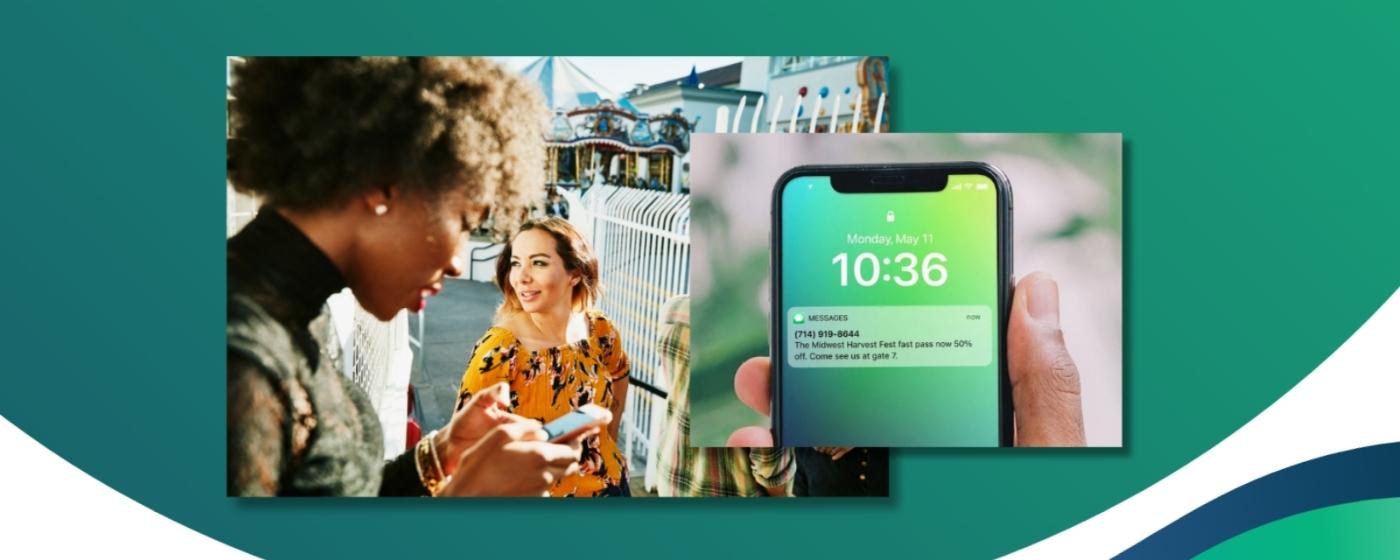
3. A day-of or hours-before reminder, especially useful for timed-entry experiences, festivals, attractions, or anything with a specific arrival window. Text messages are especially useful here because they can put time-sensitive information directly in front of attendees when they need it.
4. Post-visit follow-up, for feedback, promoting a future event or visit, or simply thanking attendees. This can be especially valuable for repeat and seasonal businesses.
Email handles the detail-heavy moments like confirmations and full logistics. Text is better suited for time-sensitive updates, like day-of reminders, last-minute changes, or "gates open now" messages. Using both gives businesses more flexibility to match the message to the moment instead of forcing every communication into the same channel.
What to look for in a ticketing platform's messaging tools
Not every platform handles confirmation and reminder messaging the same way. When you're evaluating a platform, or auditing the one you're already using, look for:
• Automated messaging. You shouldn't have to remember to send every confirmation or reminder manually.
• Targeted messaging. Look for the ability to communicate with attendees based on a specific ticket type, date, or session, rather than blasting your entire attendee list with details that only apply to some of them.
• Both email and text messaging. Email works well for detailed information, while SMS gives businesses another way to send shorter, more time-sensitive updates.
• Branded sender identity, so messages look like they're coming from the event, not from an unfamiliar third-party shortcode.
• Attendee data connected to communication tools. When ticket purchases and attendee information already live in the same platform as your messaging tools, you can reach the right people without constantly exporting and rebuilding lists.
How TicketSpice Supports Attendee Communication
TicketSpice keeps confirmation emails, email marketing, SMS text messaging, and attendee data connected in one platform, so businesses can keep attendees informed without bolting on a separate messaging tool for every part of the journey.
Communication can go out to your full attendee list or be narrowed to the people who actually need it, based on ticket type, date, or other relevant details. That matters when “gates open” means something different for Saturday ticket holders than Sunday ticket holders, or when one arrival window needs an update that the rest of your guests do not.
Because attendee contact information is already tied to the ticket purchase, businesses can send confirmations, reminders, and day-of updates without constantly exporting lists into another system. The whole sequence, from purchase to confirmation to arrival-day communication, stays more connected inside TicketSpice.
TicketSpice vs. Eventbrite for Attendee Communication
TicketSpice gives businesses more control over how attendee communication fits into the full ticketing experience. Customizable confirmation emails, email marketing, SMS text messaging, targeting, and attendee data stay connected inside the same TicketSpice ecosystem, making it easier to build communication around the way your business actually operates.
Eventbrite relies heavily on its own event-based communication framework, including Eventbrite-branded confirmation delivery. TicketSpice gives businesses a more connected, brand-first way to manage confirmations, targeted reminders, and time-sensitive updates from purchase through arrival.
For businesses comparing TicketSpice vs. Eventbrite for attendee communication, TicketSpice provides a more connected approach to confirmations, targeted reminders, and time-sensitive updates without constantly exporting attendee lists or piecing together separate communication workflows.
Attendee Communication FAQs
What should a ticket confirmation email include?
A ticket confirmation email should include the attendee’s purchase details, ticket type, date or arrival time, location, and any important next steps such as downloading a ticket, saving it to a phone, or watching for additional instructions before arrival.
Is TicketSpice better than Eventbrite for attendee communication?
TicketSpice is a stronger fit for businesses that want confirmations, email marketing, SMS text messaging, targeting, and attendee data connected more closely to the ticketing experience. Compared with Eventbrite’s more rigid, Eventbrite-controlled communication experience, TicketSpice gives businesses a more brand-first and connected way to manage attendee communication from purchase through arrival.
Should businesses send both email and text reminders to attendees?
Yes. Email is useful for detailed information like confirmations and logistics, while SMS works well for shorter, time-sensitive reminders or updates closer to arrival. Using both gives businesses more flexibility to match the message to the moment.
Can TicketSpice send confirmation emails and text reminders?
Yes. TicketSpice connects customizable confirmation emails, email marketing, SMS text messaging, and attendee data in one platform so businesses can communicate with ticket buyers throughout the attendee journey.
Can TicketSpice target messages to specific attendees?
Yes. TicketSpice can help businesses narrow communications based on relevant attendee or ticket information, making it easier to send updates to the people who actually need them instead of messaging the entire attendee list.
Can TicketSpice send reminders without exporting attendee lists?
Yes. Because attendee contact information is already connected to ticket purchases in TicketSpice, businesses can send email and SMS communications without constantly exporting and rebuilding attendee lists in separate tools.
Are text reminders useful for timed-entry events and attractions?
Yes. Text reminders can be especially useful for timed-entry events, attractions, festivals, and other experiences where attendees need time-sensitive information about arrival windows, schedule changes, parking, or entry instructions.
Why TicketSpice Makes Attendee Communication Easier
Confirmation and reminder messaging aren’t just nice-to-haves layered on top of ticketing. They are part of the experience attendees actually notice from the moment they buy a ticket to the moment they arrive.
TicketSpice keeps customizable confirmation emails, email marketing, SMS text messaging, and attendee data connected in one platform, making it easier for businesses to send the right information at the right time without stitching together separate tools or exporting attendee lists.
A clear confirmation, a useful reminder, and a well-timed day-of update can mean fewer confused attendees, fewer support messages, and a smoother experience for everyone involved.
Build the communication sequence once, keep it connected to your ticketing, and let TicketSpice help handle the reminding from there.
We’re here to help you keep attendees informed and arrival day running smoothly.
— The TicketSpice Team